Hobby: SVG graphics with Lua
Hobby is a Lua scripting tool for creating programmable SVG vector graphics. It is well suited for technical illustrations, geometric constructions, diagrams, and any kind of graphic that benefits from algorithmic generation.
Hobby is named after John Hobby, the developer of MetaPost, and brings two key ideas from that system into a modern Lua environment:
Smooth curves — The Hobby-Knuth algorithm computes aesthetically pleasing Bézier curves through a set of points, with fine-grained control over tangent directions and curve tension. You specify where the curve should go and how it should arrive — the algorithm figures out the optimal control points.
Equation solver — Instead of computing coordinates by hand, you declare geometric relationships between points (midpoints, intersections, linear constraints) and let the solver determine the positions.
Quick Start
Install hobby, create a file fan.lua:
local h = require("hobby")

local cm = 28.35
local svg = h.svg():padding(5)

for a = 0, 9 do
    local path = h.path()
        :moveto(h.point(0, 0))
        :dir(45)                     -- leave at 45°
        :curveto(h.point(6 * cm, 0))
        :indir(-10 * a)             -- arrive at 0°, -10°, ..., -90°
        :stroke("black")
        :strokewidth(0.5)
        :build()
    svg:add(path)
end

svg:write("fan.svg")
Run with hobby fan.lua to produce:
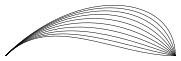
All ten curves connect the same two points. They all leave at 45° but arrive at different angles — from 0° (nearly straight) to -90° (approaching vertically). The Hobby algorithm computes a smooth Bézier curve for each combination.
Smooth Curves
The core idea: you provide a set of points, and the algorithm computes Bézier control points that produce a visually smooth curve. Compare the straight-line polygon (dashed) with the smooth Hobby curve (blue) through the same six points:
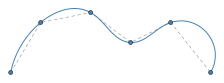
local h = require("hobby")

local points = {
    h.point(0, 0),    h.point(30, 50),
    h.point(80, 60),  h.point(120, 30),
    h.point(160, 50), h.point(200, 0),
}

local curve = h.path():moveto(points[1])
for i = 2, #points do
    curve = curve:curveto(points[i])
end
curve = curve:stroke("steelblue"):strokewidth(1):build()
Unlike simple spline interpolation, the Hobby-Knuth algorithm produces curves without unwanted oscillation. You can further control the result with direction constraints, tension, and curl.
Equation Solver
For geometric constructions, computing coordinates by hand is tedious and error-prone. The equation solver lets you declare relationships and solves for the unknown positions:
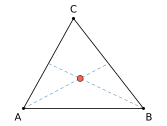
local ctx = h.context()

-- Triangle vertices
local a = ctx:known(0, 0)
local b = ctx:known(120, 0)
local c = ctx:known(50, 90)

-- Midpoints of opposite sides
local mBC = ctx:midpointof(b, c)
local mAC = ctx:midpointof(a, c)
ctx:solve()

-- Centroid = intersection of two medians
local centroid = ctx:intersectionof(a, mBC, b, mAC)
The solver handles midpoints, interpolation, collinearity, line intersections, and linear constraints mixing x and y coordinates — enough to express most MetaPost-style geometric constructions.
Documentation
- Installation – Install hobby
- Paths – Creating and building paths
- Predefined Shapes – Circles, squares, and other shapes
- Transformations – Scaling, rotating, shifting
- Styling – Colors, pens, dashes, arrows
- Path Operations – Arc length, intersections, subpaths
- Pictures – Grouping paths and labels
- Equation Solver – Constraint-based point positioning
- Reference – Complete API reference