Create a ZUGFeRD e-invoice
This recipe produces an EN 16931 / ZUGFeRD / Factur-X compliant electronic invoice: a typeset PDF/A-3b document with the machine-readable Cross-Industry-Invoice XML embedded as an attachment named factur-x.xml. The visible invoice and the embedded data come from the same XML source, so they cannot drift apart.
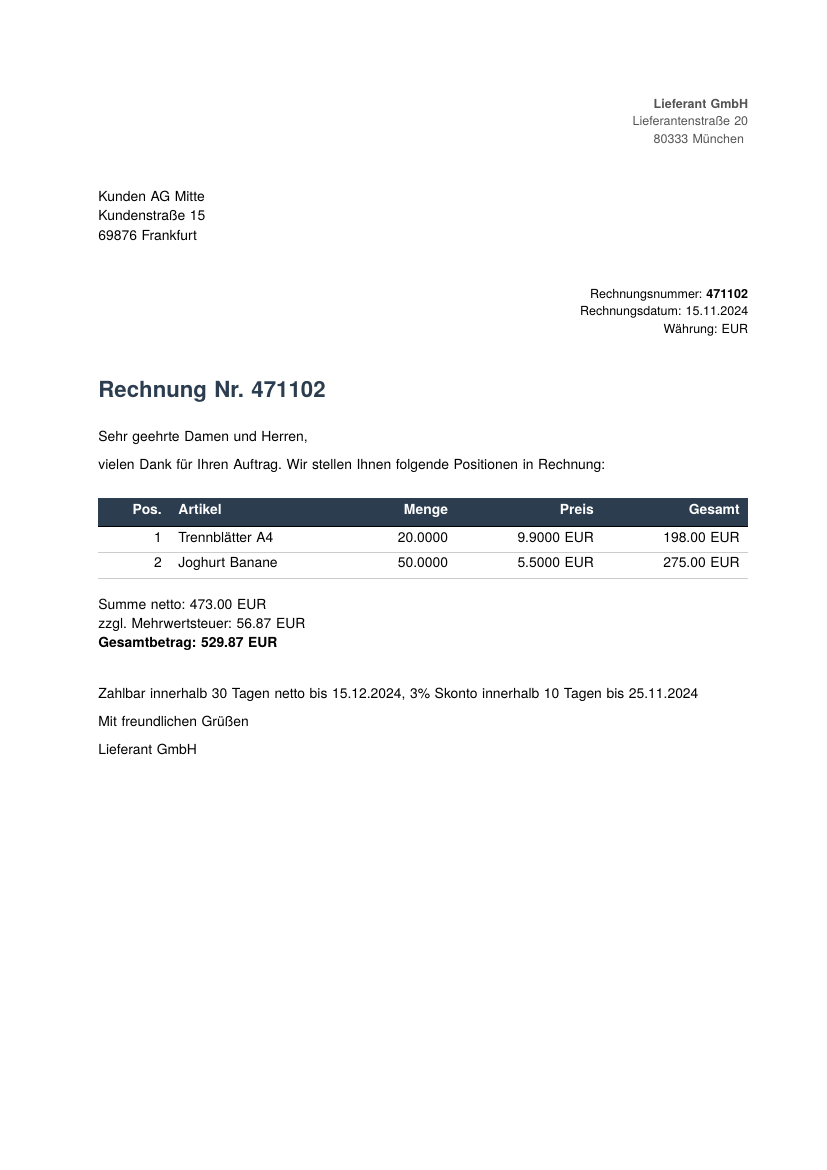
Full example: glu/markdown/zugferd-invoice
The pattern
glu has no ZUGFeRD-specific code. Everything format-specific lives in a companion Lua file that glu auto-loads next to the Markdown source. The same pattern adapts to XRechnung, PEPPOL, or any other compliance format without touching glu itself.
| File | Purpose |
|---|---|
rechnung.md |
Visible invoice in Markdown, with {= zugferd.* =} placeholders |
rechnung.lua |
Companion Lua: parses the XML, registers the compliance callback |
rechnung.css |
Layout stylesheet (letterhead, address block, totals) |
invoice.xml |
The ZUGFeRD Cross-Industry Invoice XML |
AdobeRGB1998.icc |
Output-intent color profile required by PDF/A-3 |
Step 1: request PDF/A-3b in the frontmatter
The conformance level is a generic glu frontmatter key, nothing ZUGFeRD-specific:
---
title: Rechnung
author: Lieferant GmbH
lang: de
papersize: a4
format: PDF/A-3b
css: rechnung.css
---
Step 2: parse the XML into a Lua global
rechnung.lua runs before any Lua block or inline expression in the Markdown body, which makes it the right place for data preparation. It opens the XML with the cxpath module and populates a zugferd global:
local frontend = require("glu.frontend")
local cxpath = require("xml.cxpath")

local doc = cxpath.open("invoice.xml")
doc:set_namespace("rsm", "urn:un:unece:uncefact:data:standard:CrossIndustryInvoice:100")
doc:set_namespace("ram", "urn:un:unece:uncefact:data:standard:ReusableAggregateBusinessInformationEntity:100")

zugferd = {
    id    = doc:eval("/rsm:CrossIndustryInvoice/rsm:ExchangedDocument/ram:ID").string,
    -- … date, currency, seller, buyer, lines, totals …
}
All values stay strings: no float rounding drift, and locale formatting remains under your control.
Step 3: use the data in the Markdown body
Inline expressions pull single fields, and a {lua} block builds the line-items table as a Markdown pipe table:
# Rechnung Nr. {= zugferd.id =}

```{lua}
local out = {
    "| Pos. | Artikel | Menge | Preis | Gesamt |",
    "| ---: | --- | ---: | ---: | ---: |",
}
for _, l in ipairs(zugferd.lines) do
    table.insert(out, string.format(
        "| %s | %s | %s | %s %s | %s %s |",
        l.pos, l.name, l.qty,
        l.price, zugferd.currency,
        l.line_total, zugferd.currency))
end
return table.concat(out, "\n")
```
Step 4: attach the XML and the XMP extension
The compliance plumbing runs in a page_init callback, because that is the first moment the live document object is available. A guard makes sure it runs exactly once:
local initialized = false

frontend.add_callback("page_init", "zugferd-compliance", function(d, _page, pagenum)
    if initialized then return end
    initialized = true

    -- PDF/A-3 requires an output intent.
    local cp = d:load_colorprofile("AdobeRGB1998.icc")
    cp.identifier = "AdobeRGB1998"
    cp.registry   = "Adobe"
    cp.condition  = "RGB"
    cp.colors     = 3

    d:attach_file({
        filename    = "invoice.xml",
        name        = "factur-x.xml",
        mimetype    = "text/xml",
        description = "Factur-X/ZUGFeRD invoice",
    })

    d:add_xmp_extension({
        schema        = "Factur-X PDFA Extension Schema",
        namespace_uri = "urn:factur-x:pdfa:CrossIndustryDocument:invoice:1p0#",
        prefix        = "fx",
        properties = {
            { name = "DocumentFileName", value_type = "Text", category = "external", description = "The name of the embedded XML document" },
            { name = "DocumentType",     value_type = "Text", category = "external", description = "The type of the hybrid document in capital letters, e.g. INVOICE or ORDER" },
            { name = "Version",          value_type = "Text", category = "external", description = "The actual version of the standard applying to the embedded XML document" },
            { name = "ConformanceLevel", value_type = "Text", category = "external", description = "The conformance level of the embedded XML document" },
        },
        values = {
            ConformanceLevel = "EN 16931",
            DocumentFileName = "factur-x.xml",
            DocumentType     = "INVOICE",
            Version          = "1.0",
        },
    })
end)
Run and verify
glu rechnung.mdCheck the attachment and the XMP metadata:
pdfdetach -list rechnung.pdf
# 1 embedded files
# 1: factur-x.xml

exiftool -XMP-pdfaid:Part -XMP-fx:ConformanceLevel \
         -XMP-fx:DocumentFileName rechnung.pdf
# Part                : 3
# Conformance Level   : EN 16931
# Document File Name  : factur-x.xml
veraPDF validates the PDF/A-3b side:
verapdf --flavour 3b rechnung.pdfAdapting for your own invoices
- Replace
invoice.xmlwith the CII XML from your billing system. - Adjust
rechnung.mdandrechnung.cssto your layout. rechnung.luaneeds no changes: the XPath mappings cover every EN 16931 mandatory field.
Related
- Compliance formats in the Markdown mode reference
- Callbacks for the
page_initlifecycle - xml.cxpath module for the XPath API