Highlight and mark up text
Review copies, study notes and teaching material mark words the way a reader does with a pen: a highlighter over a phrase, a line through what goes, a wavy line under a typo. In glu each of these is one CSS property on an inline element, background-color for the highlighter and text-decoration for the pen. This recipe marks up a draft in plain Markdown.
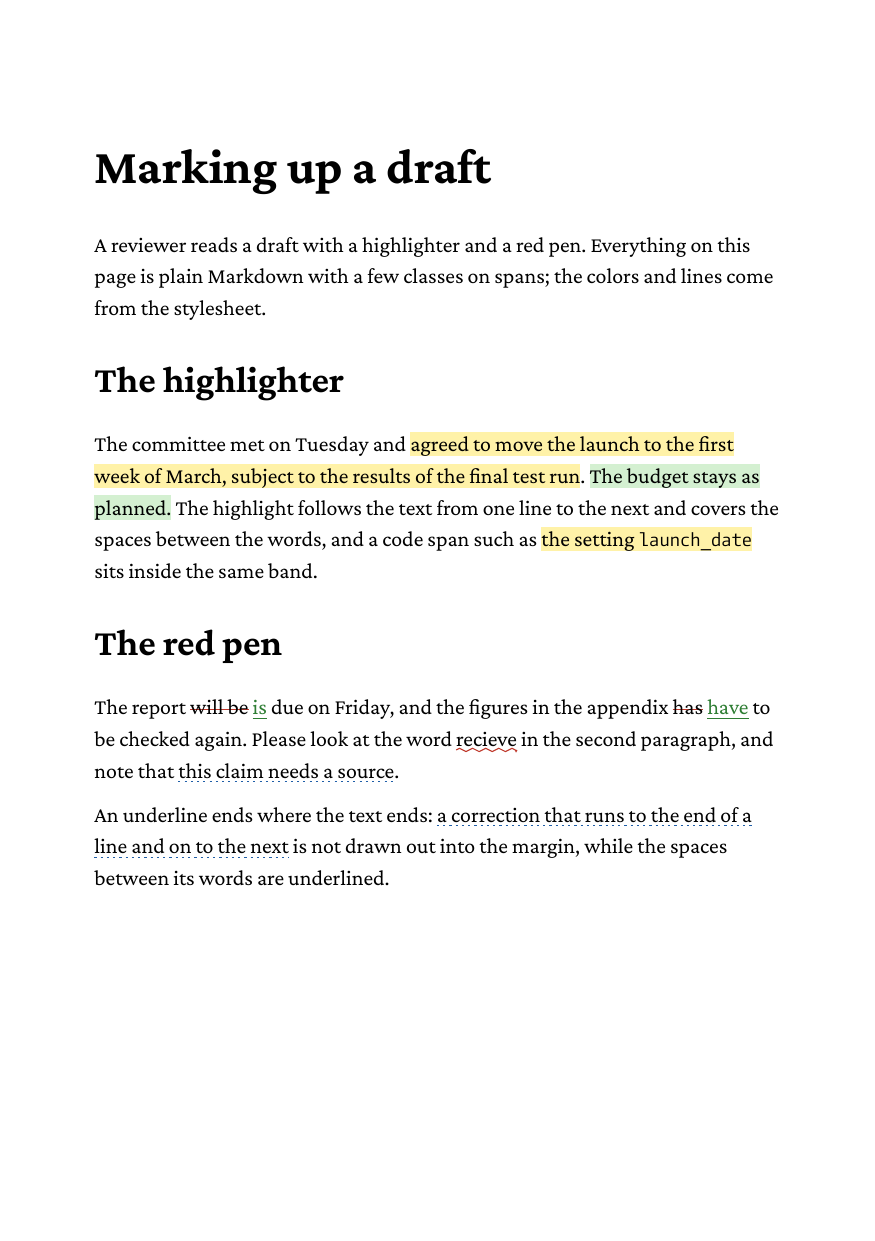
Full example: glu/markdown/highlighting
Step 1: the highlighter
Mark the phrase with a bracketed span and a class:
The committee met on Tuesday and [agreed to move the launch to the
first week of March]{.mark}. [The budget stays as planned.]{.mark .green}
and give the class a background:
.mark  { background-color: #fff1a8; }
.green { background-color: #d3efd0; }
In HTML the same goes for any inline element. <mark> has no style of its own in glu, so give it one: mark { background-color: #fff1a8; }.
The band behaves like a highlighter pen, and like the browser:
- It is painted line by line, from the first to the last letter of the span on each line, so a highlight that crosses a line break becomes two stripes.
- It runs behind the spaces between the words, and a span of nothing but spaces is painted as well.
- It reaches from the ascent to the descent of the span’s font, the font’s content area, not just the em box. The leading between the lines is not part of it, so the stripes of consecutive lines stay apart.
- Its height comes from the span’s own font. A code span inside a highlight, or a glyph that comes from a fallback font, sits in the same band instead of making a step in it. A nested element set much larger than the span sticks out of the band.
Backgrounds nest: an element with its own background inside a highlight is painted on top of it. padding-left and padding-right widen the band beyond the letters, which suits a label more than a highlight:
.tag { background-color: #e3ecf5; padding: 0 3pt; }Step 2: the red pen
Strikethrough is Markdown’s own ~~text~~, which becomes <del> and is struck through by default. The other marks are spans again:
The report ~~will be~~ [is]{.ins} due on Friday. Please look at
the word [recieve]{.spell}, and note that [this claim needs a
source]{.query}.
del { text-decoration-color: #c0392b; }
.ins { color: #2e7d32; text-decoration: underline #2e7d32; }
.spell { text-decoration: underline wavy #c0392b; }
.query { text-decoration: underline dotted #1f5fa8; }text-decoration takes a line (underline, overline, line-through), a style (solid, double, dotted, dashed, wavy) and a color, in any order; text-decoration-line, text-decoration-style and text-decoration-color set them one by one. The Letterforms page shows all five styles.
Without a color the line takes the text color of the element that declares the decoration, and keeps it inside: a link in an underlined sentence changes the color of its letters, not that of the line.
Where the line ends
An underline belongs to the text, not to the line it stands in. The spaces between the words are underlined, but at the end of a line the decoration stops at the last letter: a correction that wraps onto the next line is not drawn out into the margin, and it does not run into the room a ragged line leaves at its end.
Backgrounds are painted before decorations, so an underline inside a highlight stays visible.
Limits
- The thickness and position of a line come from the font size;
text-decoration-thicknessandtext-underline-offsetare not supported. - An underline is drawn through descenders;
text-decoration-skip-inkis not supported. - A highlight is a rectangle per line;
border-radiusdoes not round it.