Lines and leading
line-height and the leading model
line-height sets the distance from baseline to baseline. The part of
it that exceeds the natural size of a line (ascenders plus descenders)
is the leading, and there are two schools on where it belongs:
- CSS half-leading (
-bag-leading-model: half, the default): half of the leading sits above the line box, half below it, as CSS 2.1 §10.8.1 specifies. The first baseline of a block moves down by half a leading, and the last line keeps half a leading below its descenders. - The TeX model (
-bag-leading-model: trailing): the line keeps its natural size and all of the leading goes below it, as an inter-line gap, the last line included. The first line starts right at the top edge of the block, and a full leading follows the last.

The screenshot shows both models with the
hboxes trace switched on: under half every line box
is inflated to the full line-height, under trailing the boxes
stay at their natural size and the leading is visible as the gap
between them. Baseline-to-baseline distances are identical in both
models; what changes is where a paragraph starts and ends relative to
its first and last baseline, which is what margins and page breaks
work with.
The property is inherited, so it can be flipped for the whole document
on body or for a single element:
body { -bag-leading-model: trailing; } /* TeX rhythm everywhere */A Go program that embeds htmlbag can register models of its own and select them by name with the same property, for rules such as a word processor’s “exactly” spacing; see the htmlbag library.
Use trailing when reproducing documents whose reference output
comes from TeX, or when every paragraph should start right at the top
of the text block (a common layout convention in print). To trim a
single block to its text under the CSS model, use text-box-trim.
Trimming a block to its text
Under the CSS model a block’s box does not end at its text. Above the first line sit half a leading and the room the font reserves for its tallest ascenders, below the last line half a leading and the room for its descenders. In a box with a background and padding, the text then looks lower and the padding larger at the top and bottom than at the sides, and the first line of a text set next to an image does not start at the image’s top edge.
text-box-trim takes that space off:
trim-starttrims the first line above the font’s text-over edge,trim-endtrims the last line below the font’s text-under edge,trim-bothdoes both,none(the default) neither.
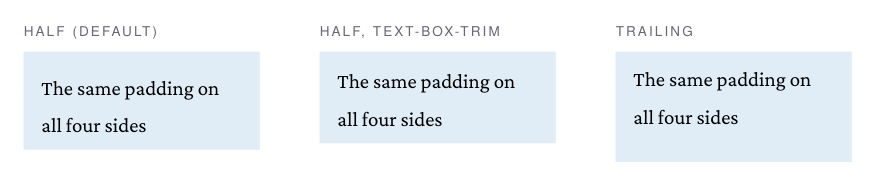
The text edges are the font’s ascent and descent, so what stays above
the first line is the room for the ascenders, not the space above
capital letters. text-box-edge chooses the edges; text (and
auto, which means the same here) is the only one supported, others
log a warning and use text. The shorthand text-box takes both,
text-box: trim-both text, and text-box: normal switches the trim
off.
The property is not inherited. On a block that holds its own lines,
such as a paragraph or a heading, it trims that block’s first and last
line. On a container of other blocks, such as a <div> around
paragraphs, the first and last line are those of its first and last
block, through nested containers, unless padding or a border on that
side of a block inside lies between. A table cell is such a container
too; a table inside a container holds none of its lines. For a box
with several paragraphs, the trim goes on the box:
.callout { background-color: #e0ecf8; padding: 3mm; text-box-trim: trim-both; }A few details:
- With
line-heightsmaller than the font’s ascent plus descent, the trim is negative: the block grows to the text edges instead of shrinking, so the ascenders do not stick out of its box. - A block split across pages is trimmed at the start of its first part
and the end of its last part only, and the lines on either side of
the page break keep their leading. Under
box-decoration-break: cloneevery fragment of a paragraph is trimmed, so the last line before a break may fit by its text. -bag-text-box-trim-at-break: trim-endtrims the last line before an unforced break, on a block that holds its own lines, so that line may fit by its text. Nothing else changes: the block keeps its height where it ends mid-page, and its first line is not trimmed.- The trim is meant for the
halfmodel. Undertrailingthere is no leading above the first line to take off, and the leading after the last line is not part of the line, sotrim-endleaves it in place.
Subscripts and superscripts
<sub> and <sup> shift to the proper script position of the
parent box: the offset is computed from the parent’s font size, not
from the (usually reduced) script size, so nested or shrunken scripts
do not collapse onto the baseline. The offsets follow common browser
practice: superscripts rise by 1/3 of the parent em, subscripts drop
by 1/5.

For manual control, vertical-align accepts lengths and percentages
(of the element’s line-height), positive values raise, negative
values drop:
.raise { vertical-align: 0.6em; font-size: 70%; }
.drop  { vertical-align: -30%;  font-size: 70%; }
Shifts add up across nesting levels, so a <sup> inside a shifted
span keeps its relative position.
Whitespace and tabs
white-space controls both wrapping and space collapsing, with the
CSS values normal, nowrap, pre, pre-wrap and pre-line. In
the preserving modes the space keeps the width of the font’s space
glyph, so ASCII art and aligned code line up column for column, and
tab-size (default 8) sets the tab stops:
pre { white-space: pre; tab-size: 4; }