Table lines that stay visible in Adobe Acrobat
If you have looked at a PDF table in Adobe Acrobat and found thin lines missing, thinner than their neighbors, or coming and going as you zoom, the PDF is most likely fine. The lines are where they should be. What hides them is the order in which they are painted.
Where the problem lies
A PDF page is painted like a canvas: everything covers what was painted before it. A viewer shows the page on a grid of pixels, and Acrobat rounds and smooths the edges of filled areas to fit that grid. A hairline of 0.3pt is narrower than a pixel at most zoom levels. When a colored area next to it is painted later, the rounded edge of the area reaches into the pixels of the line and paints over them. On paper the two only touch. On screen the area wins.
Tables show this more than anything else. A table is usually painted cell by cell: a cell’s background, then its borders, then the next cell. Every border along the edge of a cell with a background, be it a zebra stripe, a header row or plain white, is painted over by the background of the neighbor that comes after it.
The cure is to paint the lines after the areas, so that nothing can cover them anymore. CSS has asked for exactly this since CSS 2.1: a table paints the backgrounds of the table, its columns, rows and cells first, and all of its borders after them (Appendix E).
The picture shows both in Adobe Acrobat. Rows and columns of white and yellow, with a black hairline at every edge: on the left each line is painted before the area that follows it, on the right all lines are painted last.
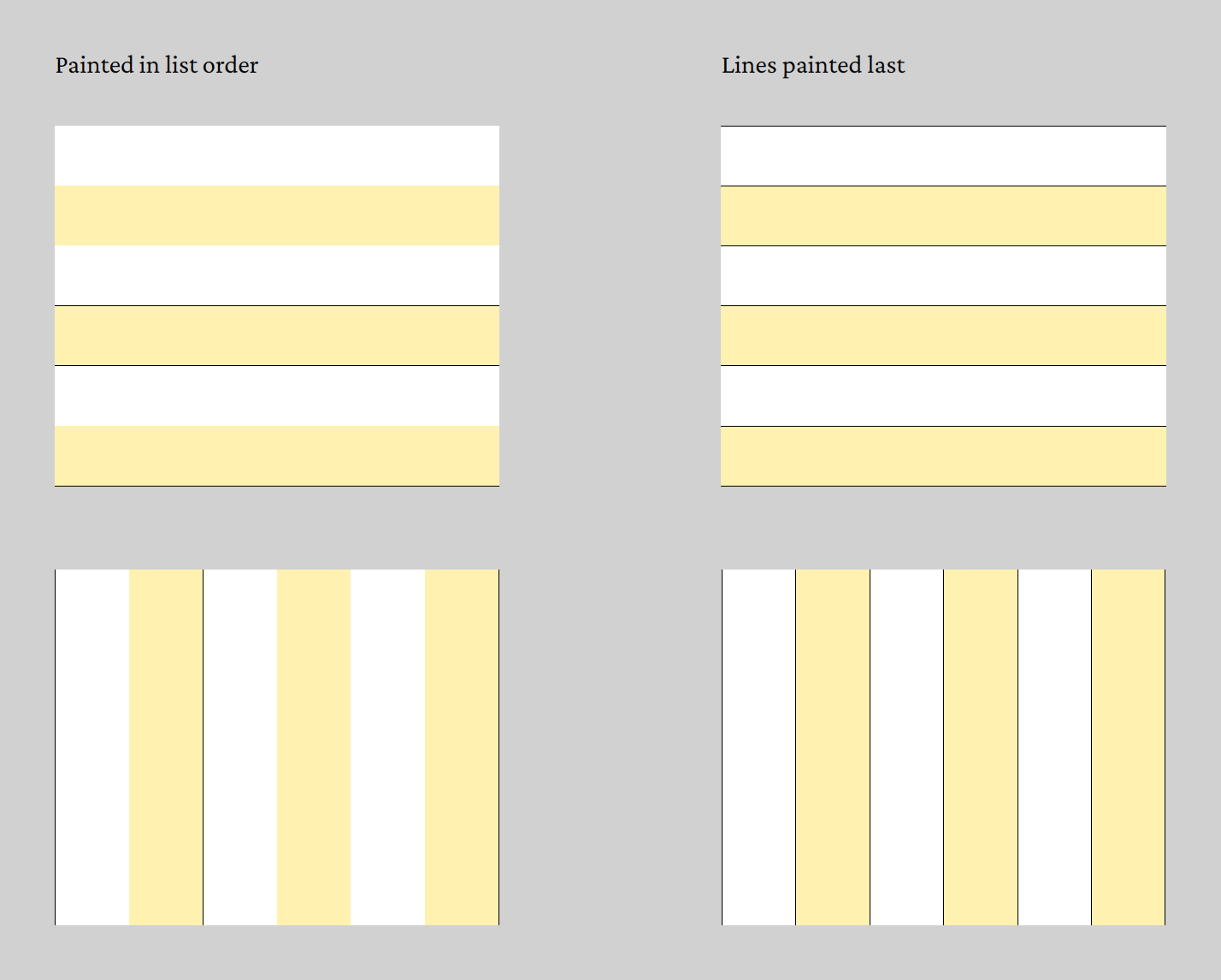
Tables: on by default
In the current releases, every table boxes and glue builds paints its cell borders after all of its cell backgrounds. There is nothing to switch on. This covers
- HTML and Markdown tables in glu and bagme,
- tables in XTS,
- tables you build in Go with
frontend.BuildTable.
The borders keep their place in the table. Only their painting moves, and only to the end of the table, not to the end of the page: an image or a stamp you place over the table later still covers its borders. In tagged PDF (PDF/UA) the borders are now marked as layout artifacts, as decoration should be, instead of counting as content of their cells.
Every example we have renders as before, except where a border runs along a colored row. There the line is now visible.
Your own lines in Go
The mechanism behind it is open to Go programs. Two attributes from
the package backend/document do the work:
document.PaintLaston a rule or a vertical list paints it after everything else on the page. The node keeps its place and its space in the list, only its painting is deferred. This works in vertical and in horizontal lists.document.PaintLastScopeon a vertical list paints the marked nodes inside it as soon as that list is done, instead of at the end of the page. This is what a table uses.
line := node.NewRule()
line.Width = bag.MustSP("6cm")
line.Height = bag.MustSP("0.3pt")
line.Attributes = node.H{
    document.PaintLast: true,
    // In tagged PDF, paint the line as decoration.
    "artifact": document.ArtifactLayout,
}
If you draw lines next to colored areas outside of tables, a rule under a shaded heading or a frame around a filled box, mark them this way and Acrobat leaves them alone.