Page breaks
A page break is a decision about lines: which ones stay at the foot of this page and which ones the reader meets at the top of the next. glu makes it block by block, and for a paragraph line by line, with a few rules that keep text and its context together. All of them are CSS properties; the CSS reference lists the exact values.
Widows and orphans
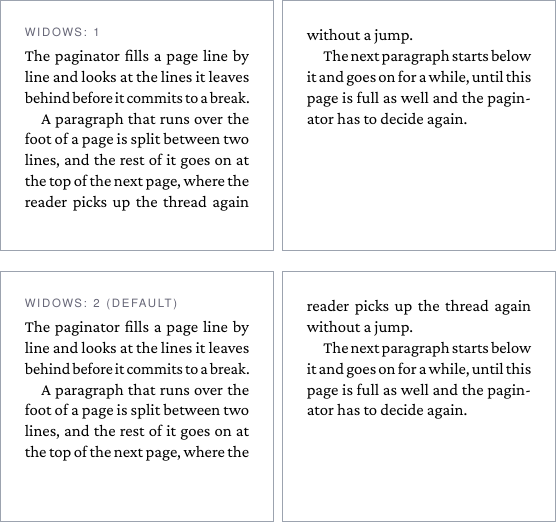
An orphan is the first line of a paragraph left alone at the foot of a page, a widow its last line alone at the top of the next. Both break the reading rhythm, and the widow in particular looks like a mistake. Two properties set how many lines a paragraph keeps together on either side of a break:
orphans: the fewest lines left at the foot of the page.widows: the fewest lines carried to the top of the next page.
Both default to 2 and are inherited. When a break would leave a single last line on the next page, the paragraph gives up a line on the first page instead, so that two go over together. The page ends one line short, which is the usual price.
Lines are pulled over for widows only while orphans lines stay
behind. When the paragraph cannot satisfy both, for example a
three-line paragraph with room for two, there is no break inside it
that obeys the rules, and it moves on to the next page whole. On a
page that holds nothing else it is split anyway, as there is no better
place for it.
body { widows: 3; orphans: 3; }  /* stricter, book style */
pre  { widows: 1; orphans: 1; }  /* code may break anywhere */
1 switches the control off. Both count the lines of a paragraph, a
list item or a <pre>, also inside a container such as a bordered
box. A container whose children are blocks breaks between them, and
those blocks are not counted as lines.
A paragraph that has to split below other content also moves on when
not even its first line fits in the rest of the page, with orphans: 1 as well. Only a line on an otherwise empty page is placed where it
does not fit.
Keeping headings with their text
A heading at the foot of a page with its text on the next is the
classic page-break mistake. break-after: avoid on a block means: do
not break between this block and the next one.
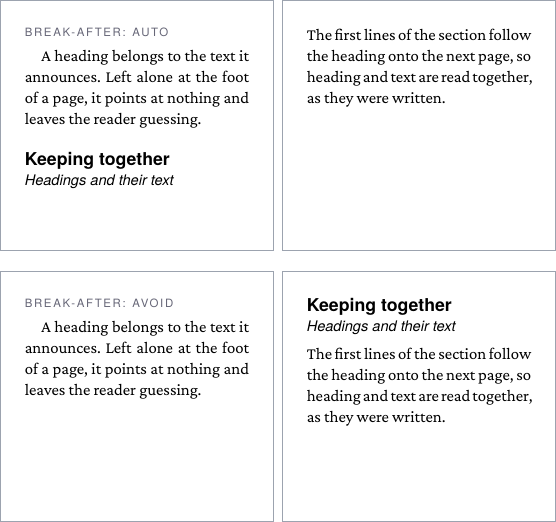
In the upper pair the text after the subheading needs two lines on the
page (orphans), the page has room for one, so the paragraph moves on
and the headings stay behind. In the lower pair both headings carry
break-after: avoid. A run of such blocks is weighed as one, together
with the first lines of the block after it (all of it, if it cannot be
split): if heading, subheading and those lines do not fit, the page
breaks before the heading. A run that
does not fit even an empty page is placed anyway.
glu’s default stylesheet already sets the rule for all headings, so Markdown and HTML documents get it without asking:
h1, h2, h3, h4, h5, h6 { break-after: avoid; }A stylesheet that wants headings to break like any other block sets
break-after: auto on them. break-inside: avoid keeps a
whole block on one page, which suits a figure with its caption or a
short box; when it does not fit, it starts on the next page. A block
that is taller than a page breaks all the same.
Forced breaks
break-before: page starts an element on a new page,
break-after: page starts what comes after it on one. always and
the older page-break-before and page-break-after mean the same.
The page side values left, right, recto and verso break the
page but do not insert a blank page to reach a given side.
section.chapter { break-before: page; }A forced break is taken at any depth, so a <section> with a heading
that starts a new page works inside other containers too. A
break-before on the first child of a block breaks before the block,
a break-after on its last child after it. A forced break wins over
orphans, widows and avoid.
Margins and heights at a break
The space around a block follows the page break, not the other way round:
- A margin at the top of a page is dropped after an automatic
break. A paragraph that moves on starts flush with the top of the
text area, whether its
margin-topwould have fit on the previous page or not, and themargin-bottomof the last block on a full page does not reappear on the next. After a forced break and at the start of the document the margin is kept. - A CSS
heightsplits like text. The space aheightadds below a block’s content fills the rest of the page, and what is left of it continues at the top of the next.widowsandorphansdo not apply to that cut, since no line follows it. A float is still placed whole.
box-decoration-break: clone gives every part of a split box its
border and padding on both sides of the break, and its background;
under the default slice the parts are open at the break.
-bag-text-box-trim-at-break: trim-end trims the leading of the last
line before an unforced break, see Lines and leading.