Color
On screen a color is light, on paper it is ink. A print file says which inks to use and how much of each. In glu that happens in CSS, with colors you define once and use by name.
CMYK and named colors
CSS takes CMYK directly, in cmyk() and device-cmyk(). For a job with a few inks, @-bag-color gives each one a name, so all rules use the name, and a change of ink is a change in one place:
@-bag-color brand { model: cmyk; c: 0; m: 80; y: 90; k: 10; }

h1 { color: brand; }
The name works in every property that takes a color. The CSS reference lists all descriptors.
Spot colors
A spot color is an ink of its own, mixed in advance, with a printing plate of its own. Define it with the model spotcolor:
@-bag-color blue {
    model: spotcolor;
    colorname: "PANTONE 300 C";
    c: 100; m: 44; y: 0; k: 0;
}
colorname is what the print shop sees, so it has to match their ink. The c, m, y and k values are the fallback for screens and for printers without that ink.
Overprint
By default a color knocks out what is below it: the plates of the lower color stay empty in the shape of the upper one. For small black text on a tint that is a risk, because the plates never meet exactly, and a slight misregister leaves a white edge along the letters.
With overprint: yes the color prints on top instead:
@-bag-color ink { model: cmyk; c: 0; m: 0; y: 0; k: 100; overprint: yes; }

body { color: ink; }
Overprint has a few rules:
- It works with CMYK and spot colors. RGB and gray colors knock out even with
overprint: yes, and so does the CSS colorblack. glu warns. - A CMYK color prints only on the plates of its nonzero components, so white with overprint disappears. glu warns.
- A PDF viewer shows the effect only with overprint preview switched on.
RGB in print
In a PDF/X file, RGB colors and pictures count as sRGB, and the print shop converts them to its inks. That is valid, and fine for pictures from a camera. Where the exact color matters, such as for a logo or for text, use CMYK or a spot color.
Look at the plates
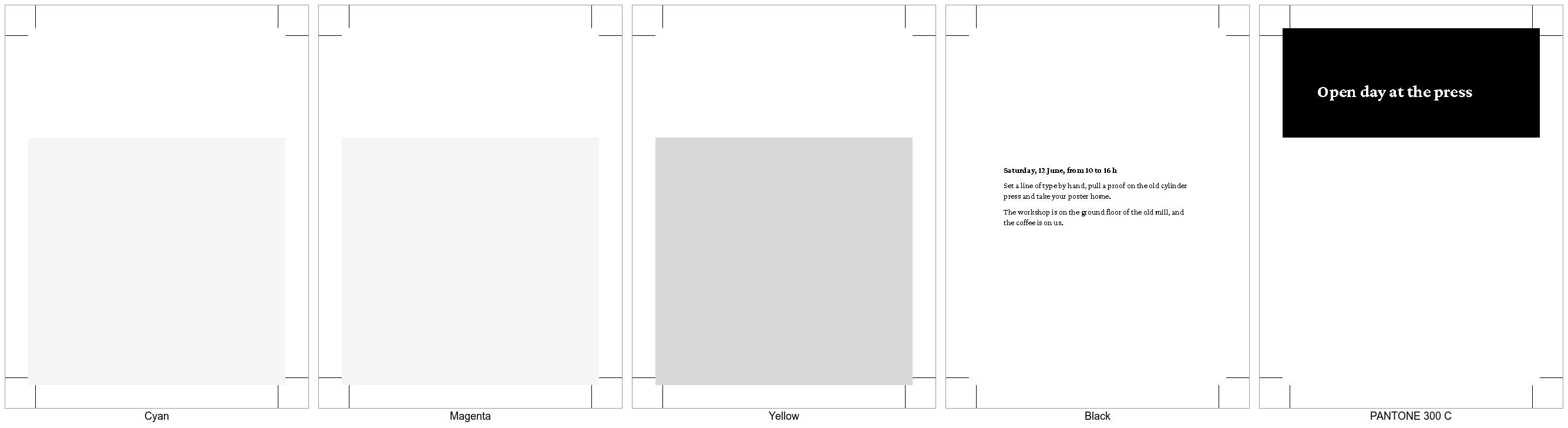
Ghostscript writes one image per ink, so you can see what each plate prints before the press does:
gs -q -o plate.tif -sDEVICE=tiffsep -r100 flyer.pdfThis produces plate(Cyan).tif, plate(Magenta).tif, plate(Yellow).tif, plate(Black).tif and one file per spot color, such as plate(PANTONE 300 C).tif. Dark means ink.
Go through them with these questions:
- Is a spot color where you expect it, and only there?
- Does the black text stand on a tint without a hole in the tint below it? Then it overprints.
- Are the crop marks on every plate? They should be.
Adobe Acrobat shows the same in its output preview, with one switch per plate.
Limits
opacityis not supported, and colors with an alpha value do not work reliably. Use a tint of the color instead.overprintworks in@-bag-color, not indefine_color()from Lua and not on colors inside SVG images.