Alignment and line breaking
text-align
The four classic values work as expected, plus the logical pair
start and end, which follow the paragraph’s
reading direction: in a left-to-right document start
means left, in a right-to-left one it means right. The default is
start.

Behind justify sits the TeX line-breaking algorithm: the paragraph
is broken as a whole, weighing all possible break points against each
other, instead of filling one line at a time and living with the
consequences. Tight and loose lines balance out across the paragraph,
which is most visible in narrow measures.
Ragged text and word spaces
Every value except justify sets ragged text: each line at its
natural width, with the slack collected at one or both ends. The word
spaces keep the width the font gives them, the glyphs are not
condensed by font expansion, and a word that
does not fit at its natural width goes to the next line. CSS Text 3
allows stretching and shrinking for justified text only, and plain
TeX’s \raggedright sets rigid spaces as well: once the edge is free
to move, nothing is gained by uneven spacing.
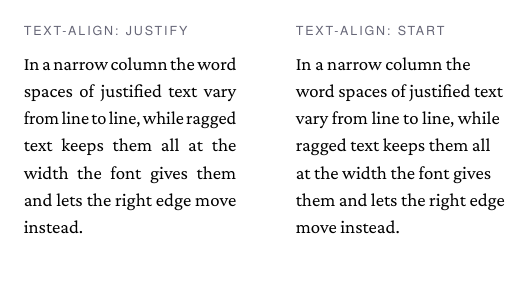
The paragraph is still broken as a whole, so a hyphen is placed only where it pays off, but every line that fits counts as good: the breaker does not try to even out the ragged edge.
The width of a word space is the advance of the font’s own space
glyph. Fonts differ more than one would expect: Crimson Pro, glu’s
serif, designs its space at 0.19 em, TeX Gyre Heros at 0.28 em. In
justified text a space may stretch by half its width and shrink by a
third, the proportions TeX has always used. A font whose space does
not shape to a real glyph, such as an emoji font, falls back to the
classic third of an em.
Hyphenation
Justification needs hyphenation to keep word spacing even, and it is
on by default (hyphens: auto) using the language’s patterns; see
Languages for how the lang attribute picks them.

The CSS values behave as in the browser:
p  { hyphens: auto; }    /* pattern hyphenation, the default */
h1 { hyphens: none; }    /* headings usually go unhyphenated */
td { hyphens: manual; }  /* only where the text offers ­ */
Under manual, soft hyphens (­, U+00AD) mark the permitted
break points by hand; under auto they are respected too and win
over the patterns for that word. How eagerly the engine hyphenates
is tunable with -bag-linebreak-hyphen-penalty.
A hyphenation point may fall inside a ligature, as in Auflage, whose break Auf-lage splits the fl ligature. If the line breaks there, it ends with Auf- and the next starts with lage, both shaped anew; otherwise the ligature stays.
First lines: text-indent and initial letters
text-indent indents the first line of a paragraph, the classic
alternative to inter-paragraph margins:
p + p { text-indent: 1.5em; margin: 0; }initial-letter sets the first letter as a drop cap spanning the
given number of lines, indenting exactly that many first rows:
.opener { initial-letter: 3; }